
558h Bet APK download and Android browser access
Check the 558h Bet APK download status, open the mobile lobby on Android, and tell a browser bookmark, a downloaded file and an installed app apart.
Open free demo
Where to get the app
There is no 558h Bet APK download published by this lobby. If you have come here to play on a phone, you can use the browser version straight away. Open the home page and look for the practice tables. You can also bookmark a specific table. An Android package is only necessary when a publisher actually distributes an Android application. The version you are reading uses ordinary web pages.
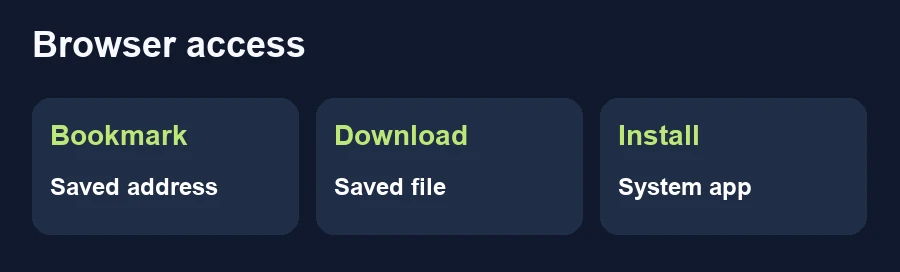
A visitor searching for “558h Bet download” might be looking for two quite different things. One is a file to keep on the phone and install. The other is a quick way back to a favourite game tomorrow. A bookmark solves the second problem immediately. It also makes a better starting point than returning through an old advertisement, because you can see and edit the address you saved.
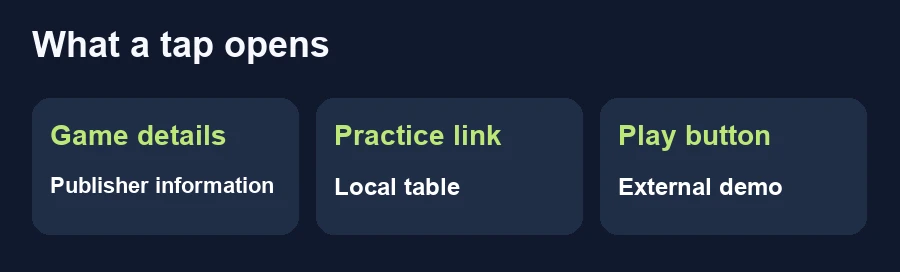
For a direct route to the local reels, open the Classic slots practice table using its text link. The number sign and the word slots at the end of the address identify that table inside the home page. Spin reels changes the three visible symbols. If the address changes to another domain after you press a promotional play button, you chose the external demo route. Use Back to return to the site and select the practice link instead.
What actually gets downloaded
When a browser displays the lobby, it requests the page, its artwork, style rules and the short scripts that handle the games. A downloaded picture of a roulette wheel is an image. A small file describing the site icon tells a browser how to display the brand. Neither item installs a casino application. You can open the site on a second phone without copying any of these individual files yourself.
An APK is a package that Android can offer to install. Downloading a package and installing it are separate events. A file can sit in Downloads even though no corresponding app appears in the system list of installed applications. Conversely, a person may have removed the original downloaded file while an installed application still exists. Check the relevant list for the particular question you are trying to answer.
Consider a common mix-up. You hold a finger on a game cover and select the browser option to save the image. Later, the cover appears in the phone gallery with the name of the game underneath. That action saved artwork. Opening the picture enlarges it; there are no reel controls behind the picture. Go back to the table in the browser to spin. Deleting the saved image has no effect on the table.
A reliable return address
The address for this site is 558hbetapk.com. Before saving it, open the address field so the entire host is visible. Browser interfaces sometimes show only the page title while you are scrolling. A title such as “558h Bet APK” is chosen by the page author and can be used by more than one site. The host in the address field identifies which site will receive your request.
Save the homepage if you normally change games. Save a table address if you want to open the same practice activity each time. Name the bookmark after the activity, such as “Blackjack practice”, so it is easy to distinguish from an image or a search result. Reopen it once before relying on it. A successful check ends with the expected table name and an action you recognise, such as Deal hand.
A bookmark preserves a destination, not a game in progress. If you save the blackjack table while holding two aces, a later visit can open that table without reproducing those two cards. The hand lives in the current document. Reloading the document starts a new session. This difference also explains why sending a table address to a friend does not send your own cards, selections or result.
On a shared phone
Browser access is convenient when several adults use one device because the local games do not require accounts. One person can finish a practice round and leave the table without handing over a password. The next person can reload the page for a fresh start. The browser itself may still remember the address in history or offer it when somebody begins typing. Those are browser features.
If you want to keep a bookmark on a shared device, choose a name that accurately describes where it goes. Avoid names such as “installed app” or “my balance”. Nobody opening it will find a wallet here. If the phone uses shared browser synchronisation, a bookmark could also appear on another device signed in to that browser account. Decide where you want to save it using your browser's own controls.
When a child also uses the phone, the adult responsible for the device controls access to the browser and its saved shortcuts. The 18+ label identifies the intended audience. It is not a device lock. Removing a shortcut from the home screen and removing a bookmark from a browser are separate actions on many phones. Check both locations if you are clearing a shared home screen.
Reading the mobile screen
A narrow phone shows a portrait composition for the main banner. The page still has the same three slides as the wide layout. Use the slide controls to change the visible scene and read the action underneath it. The welcome scene links to offer details as well as to the external project destination. Reading those details is an in-page action; selecting the commercial button leaves this page.
The small Game details control under a featured studio cover describes the original title and credits its creator. This is useful when checking whether the cover shows a recognised game or a local practice exercise. For example, the Starburst entry credits NetEnt. The Classic slots exercise is a separate three-symbol display. A file that uses one of these names does not become a published product of the studio merely by displaying its art.
If controls appear too small, increase the browser text size or zoom and scroll down to the next action. Moving the page to read a label does not play a round. A swipe across the banner can select a different slide; a vertical scroll moves further down the lobby. Look at the game heading after a swipe, especially before selecting a bright play button whose destination may be outside the current page.
If the page opens but a game does not respond
First identify the control you pressed. A picture caption and a heading are labels. Game details opens a description. The Spin wheel button in the actual practice table generates a number. These are different jobs even if all three elements refer to roulette. The address ending in the roulette fragment and the presence of the wheel result line are good signs that you reached the local table.
When text loads but the round controls fail to appear, the browser may have received the document without finishing the script request. A single reload is a reasonable test. It clears any unfinished local hand, so finish a decision first if the table is still responding. If the problem only occurs in one browser, compare the same address in another supported browser before changing settings for the whole phone.
A slow picture download can leave a blank rectangle where a game cover belongs. This is different from an installer error. The page reserves space for a cover while the browser fetches it. Scroll the cover into view and allow the image to finish. If you can read the developer name and open the details, you have already reached the catalogue. Installing an unrelated file will not repair a missing web image.
When a download is offered elsewhere
A file offered by another site needs its own publisher record. Useful details include the application identifier, release number, publication date and a way to verify the signing identity. A screenshot of a search result provides none of those facts by itself. Compare the claim to the publisher's own release notice. If the notice is missing, leave the file unopened rather than guessing from its name or size.
For example, a message might call a file the “new Bangladesh edition” while showing only the same red and gold banner visible on the web. Artwork can be copied without access to an application's signing keys. The banner tells you which design the sender wanted to imitate. It does not tell you who signed the package or what permissions that package would request after installation.
If the file has already downloaded, locating it in Downloads does not require opening an installer. You can inspect the displayed filename and remove the file through the device's ordinary file controls. Keep Play Protect enabled. A security warning on the device is a reason to stop. There is no feature of the current browser lobby that requires turning off that protection or allowing installation from a message attachment.
Shortcuts, storage and connection
A shortcut with the 558h colours can look like a native app on the home screen. Long after you created it, opening that shortcut may simply launch a browser tab. The appearance of an icon is therefore poor evidence of an APK installation. Check the address when it opens and consult the system's app information if you specifically need to identify an installed package.
A browser may keep artwork in its cache to make a later visit faster. That does not promise a fully offline game. A saved picture can appear even though a fresh page request cannot reach the server. If the goal is to test a network problem, compare a new tab opened on another ordinary website and then return to the lobby. Avoid clearing all browser data as the first diagnostic step.
Before changing phones, copy the bookmark or write down the exact address. That is enough to find the public lobby on the new device. The old phone's download folder and saved gallery pictures are unnecessary for this purpose. Once the new phone shows the expected heading, open a practice table and try a round. A fresh result confirms that the local interface responds on the new device.
Keeping an accurate record
If you are helping another adult find the lobby, send the address and the name of the activity you mean. “Open the local single-zero wheel” is clearer than “download the casino”. The recipient can recognise the button, the numbered result and the green zero without touching an installer. This also avoids confusion between the bright external demo links and the text links for practice games.
For an actual Android release, the useful answer to “where do I get it?” would include an identified publisher, a verifiable listing and a build that can be matched to that listing. Until such a release is documented for this project, the practical choices here are straightforward. Save the page you use, open the browser table for a practice round, and consult the release record before treating a future file as an update.
Keep that saved address separate from any installer attachments you may already have received. Opening your bookmark should bring up a readable web page with the expected game or article heading.